 PixelToBead
THE LITTLE PICTURE-TO-PATTERN WORKSHOP
Image to cross stitch
Crop close, simplify the colors, and turn your own photo into a counted chart.
The flower is an original illustration, converted here with the same engine as your images.
THE SHOPPING LIST
Your DMC thread key
Matching against 489 reference shades.
Screen colors are approximate. Skeins assume two strands, a 25% allowance and ~0.5 inches per strand per full cross at 14-count; check your own tension. “Have it” checks are kept only until this page closes.
| Have it | Symbol | Thread | Shade | Stitches | Est. skeins |
|---|
Palette: MakeBead craft-color-codes, CC BY 4.0 compilation. Adapted to a local Lab matcher. Reference RGB values are not physical thread measurements. DMC is a third-party trademark; PixelToBead is independent.
A REAL LITTLE CONVERSION
From pixels to a thread key
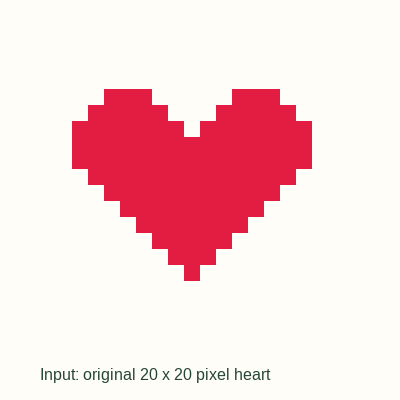
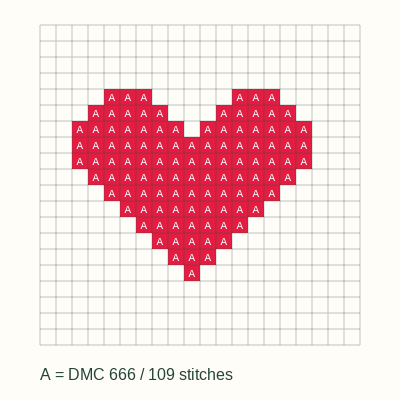
Original artwork. Generated with this converter at a 20-stitch width, 4-color limit, no dithering and no smoothing. Transparent borders stay unstitched.
Turn an image into a stitchable picture
The image to cross stitch tool converts photos and illustrations into full-cross charts using DMC reference colors. Your image is decoded, resized and converted inside your browser. It is not sent to an image-processing server. You can try the original flower sample before choosing a personal photograph.
Pick an image with a clear subject
A pet portrait, single flower or simple illustration is a useful starting point. A wide scene with many tiny objects may become hard to recognize at a small stitch count. The converter can reduce colors, but it cannot invent missing facial details or distinguish a subject from a busy background.
Choose PNG, JPEG or WebP up to 20 MB and 24 megapixels. HEIC needs conversion on your device first. For a transparent PNG, pixels below 50% opacity stay unstitched; other semi-transparent pixels are blended against white before color matching.
Crop before you add stitches
Open Crop your picture below the file picker. Drag a rectangle around the subject and choose Apply crop. The output uses that rectangle without changing the original file. Use full image restores the complete picture.
A tighter crop gives important features more of the available stitches. Keep some breathing room around a head or flower, and check that the crop does not cut away an outline you want to preserve. There is no automatic background removal in this version.
Compare detail and color
Begin with 80 stitches across and the default limit of 20 colors. If eyes or thin lines disappear, try a larger width. The output height follows the cropped image proportions, with a maximum of 320 stitches. More source megapixels alone do not guarantee more chart detail.
Keep smoothing on for most photographs. Try dithering for gradual shading, then inspect Symbols view for scattered colors that would be tedious to stitch. A clean illustration may work better with both dithering and smoothing off. Judge the actual grid rather than only the stitched thumbnail.
Keep your photo private and your chart portable
Download PNG includes the symbol chart and its thread legend. Download PDF creates numbered chart sheets and a thread key locally on your device. A separate CSV holds the thread shopping list. No account, cloud gallery or payment is required.
The current page keeps the working image only while it is open. Save your exports before leaving, and keep the source image if you want to regenerate it later. You retain your rights in your image; only convert pictures you are entitled to use.
BEFORE YOU THREAD THE NEEDLE
Frequently asked questions
Are my photos uploaded or saved?
No. The converter uses Canvas and a local browser worker. Photos and crop data stay in page memory and are not uploaded. Save exports before closing; the page does not keep an editable project.
Can I use a phone photo in HEIC format?
Convert it to JPEG, PNG or WebP on your device first. Accepted files must be at most 20 MB and 24 megapixels. A tight crop often helps more than a very large original.
Is a photo from my phone good enough?
Usually yes. A modern phone photo has far more pixels than a chart can use, so a sharp 12 megapixel shot is plenty for 80 or 160 stitches. What matters is the subject, not the file size: bright, even light, the face in focus and no extreme zoom. A soft or blurry original cannot be sharpened by a bigger stitch count.
What if the background is messy?
There is no automatic background removal in this version. Crop tight so the subject fills the frame, or flatten the background to one colour in any image editor before uploading. A busy backdrop becomes scattered single stitches, one thread change each, and makes a chart tiring to follow.
What if I crop away something important?
Upload the original again and use the full-image button, then drag a wider crop. Keep at least a few stitches of margin around a head, hands or a flower outline so the edge does not look cut off in the finished piece. Crop values do not change your file, so nothing is lost by trying again.