 PixelToBead
THE LITTLE PICTURE-TO-PATTERN WORKSHOP
Cross stitch pattern generator
Pick stitch width and colour limit with numbers, not guesswork: what each setting does to your chart.
The flower is an original illustration, converted here with the same engine as your images.
THE SHOPPING LIST
Your DMC thread key
Matching against 489 reference shades.
Screen colors are approximate. Skeins assume two strands, a 25% allowance and ~0.5 inches per strand per full cross at 14-count; check your own tension. “Have it” checks are kept only until this page closes.
| Have it | Symbol | Thread | Shade | Stitches | Est. skeins |
|---|
Palette: MakeBead craft-color-codes, CC BY 4.0 compilation. Adapted to a local Lab matcher. Reference RGB values are not physical thread measurements. DMC is a third-party trademark; PixelToBead is independent.
A REAL LITTLE CONVERSION
From pixels to a thread key
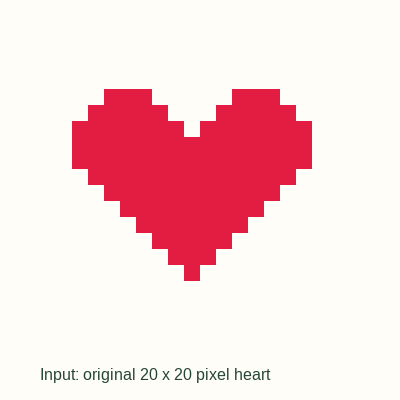
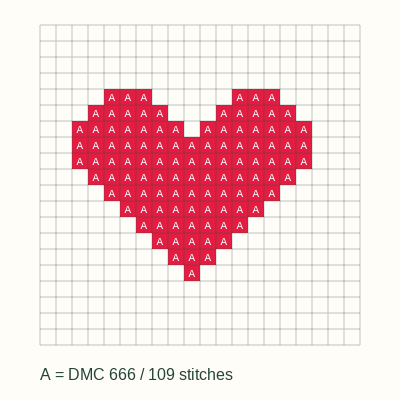
Original artwork. Generated with this converter at a 20-stitch width, 4-color limit, no dithering and no smoothing. Transparent borders stay unstitched.
Set the two numbers before you convert
This page is the settings companion to the cross stitch pattern maker. The converter itself sits above and is the same on every page of this site. What changes here is the advice: stitch width decides how much detail survives, colour limit decides how many threads you will be buying and switching. Pick those two deliberately and most disappointing charts disappear before you ever start stitching.
What a given width actually gives you
Width is the number of stitches across. For a square picture, the height matches it, so the total is the width squared. These are the ranges that work in practice, with a colour limit to start from:
| Pattern width | Total crosses (square) | Subject it suits | Start with |
|---|---|---|---|
| 20 | 400 | a single letter, a small heart, a pin badge | 4–6 colours |
| 40 | 1,600 | a simple icon, one flower, a small motif | 6–10 colours |
| 80 | 6,400 | a pet portrait, a logo, a greeting card front | 12–20 colours |
| 120 | 14,400 | a single face close-up, a small framed piece | 16–28 colours |
| 160 | 25,600 | a detailed photograph, the centre of a sampler | 20–40 colours |
| 240 | 57,600 | a large framed portrait or a full album page | 24–40 colours |
Doubling the width quadruples the stitching, not doubles it. That is the single most useful number on this page: 80 to 160 turns a three-evening project into a month of evenings, and it does not automatically make the picture twice as readable.
Three settings that go wrong
A face that is too small. Eyes, nostrils and the line between lips need about two or three stitches each to survive. If a face occupies fewer than roughly 25 stitches across in the finished chart, it turns into a smudge no colour limit can rescue. Crop so the face fills the frame instead of fitting a whole body into 160 stitches.
A busy background. Trees, railings, patterned wallpaper and clutter break into isolated single stitches, which stitchers call confetti. Every one of them is a thread change. This tool has no automatic background removal, so crop the subject tight, or paint the background a flat colour in any image editor before uploading.
Dithering left on. Dithering trades clean blocks of colour for a mix of neighbours to fake a gradient. On a photograph it can look convincing in preview and miserable in hand: one 10 by 10 block may end up needing four or five thread numbers, each present for a handful of stitches. Turn it off for logos, pixel art, lettering and flat illustration, and judge the Symbols view rather than the pretty thumbnail.
A worked comparison
Take one pet photograph and convert it three times. At 80 wide with 16 colours and dithering off, a sitting cat is a confident silhouette: outline, eyes, nose, two fur tones. At 160 wide with 24 colours the same cat gains whiskers and shading but also crosses the threshold where a beginner starts miscounting rows. At 80 wide with dithering on, the fur reads softer in the preview and turns into scattered singles on the chart.
Print one small test sheet before committing to a large project. A single A4 page of the centre of the chart costs a few minutes and shows the confetti problem better than any screen preview. If the test page is hard to follow with your own eyes and light, a larger width will not fix it: change the crop or lower the colour limit instead.
BEFORE YOU THREAD THE NEEDLE
Frequently asked questions
Are my photos uploaded or saved?
No. The converter uses Canvas and a local browser worker. Photos and crop data stay in page memory and are not uploaded. Save exports before closing; the page does not keep an editable project.
Why are there fewer colors than my selected limit?
The limit is a maximum. Similar image groups can map to the same DMC shade, and some images contain fewer distinct colors. The thread key lists only references actually used.
Is 80 or 160 stitches better for a photo?
A square chart at 80 stitches wide is 6,400 crosses; at 160 it is 25,600, four times the stitching. Choose 80 for a card, a small motif or a first project. Move to 120 or 160 only when a face, fine outline or lettering has to stay readable, and crop before you go wider.
When should I turn dithering off?
Dithering mixes neighbouring thread colours to suggest a gradient, but it also creates isolated single stitches. Turn it off for logos, pixel art, lettering and flat illustrations. For photographs, compare Symbols view with it on and off, and drop it if one 10 by 10 block needs more than about four thread numbers.
What does the smoothing switch change?
Smoothing averages source pixels when the picture is resampled down to the grid. It usually helps photographs and shaded illustrations. Turn it off when hard pixel edges matter more than averaged detail: pixel art, crisp logos, screenshots and sharp line art.