 PixelToBead
THE LITTLE PICTURE-TO-PATTERN WORKSHOP
Cross stitch chart maker
Give every stitch a symbol, every thread a code, and every page a place.
The flower is an original illustration, converted here with the same engine as your images.
THE SHOPPING LIST
Your DMC thread key
Matching against 489 reference shades.
Screen colors are approximate. Skeins assume two strands, a 25% allowance and ~0.5 inches per strand per full cross at 14-count; check your own tension. “Have it” checks are kept only until this page closes.
| Have it | Symbol | Thread | Shade | Stitches | Est. skeins |
|---|
Palette: MakeBead craft-color-codes, CC BY 4.0 compilation. Adapted to a local Lab matcher. Reference RGB values are not physical thread measurements. DMC is a third-party trademark; PixelToBead is independent.
A REAL LITTLE CONVERSION
From pixels to a thread key
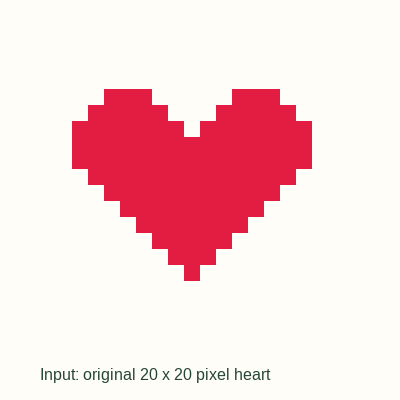
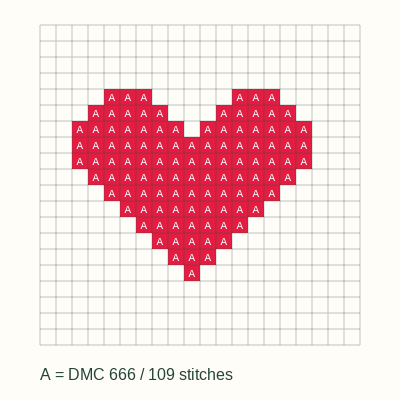
Original artwork. Generated with this converter at a 20-stitch width, 4-color limit, no dithering and no smoothing. Transparent borders stay unstitched.
Make a chart you can follow on paper
This cross stitch chart maker turns your image into a symbol grid and a matching DMC thread key. Upload a picture or use the flower sample, then switch the preview to Symbols. Each used color receives a unique letter or number. Empty squares represent transparent areas that do not need stitching.
Read the grid
One square is one full cross. Follow the assigned symbol as well as the background color, particularly when two thread shades look similar on screen. Bold grid lines mark every tenth row and column. Zoom controls let you inspect symbols without changing the stitch dimensions.
The Stitches preview is a visual suggestion of the finished texture. It is not the printable working chart. Use Symbols to inspect tiny details, and download the PNG when you want the full chart and legend in one image.
Print a large pattern in manageable sections
Choose Download PDF to save a document generated on your device. Its first section contains the thread key, fabric dimensions and shopping estimates. The following sheets split the pattern into blocks of up to 50 columns and 60 rows. Each sheet names its global column and row ranges.
Pages run from left to right across the pattern, then continue on the next row of blocks. There is no overlap between sheets. Use the printed ranges to line up adjoining sections. At a page edge, the next numbered row or column continues immediately on the next sheet.
Open the downloaded PDF and choose your printer. The document uses A4 portrait pages; printer settings can alter margins or scaling. Check print preview before committing paper. The chart is a reading aid, not a life-size fabric template.
Check your thread key
Each row lists a symbol, DMC reference, shade name, stitch count and estimated skeins. Tick Have it to build a temporary inventory checklist. Download thread list preserves those checks in a CSV; refreshing or closing the page clears them.
Estimates assume two strands, approximately half an inch per strand per cross on 14-count fabric, and a 25% allowance. Fabric count adjusts that estimate. Long carries, knots, waste and your stitching method change actual consumption.
Before you begin
Add a fabric border beyond the displayed stitched dimensions. Verify subtle colors with physical floss: the digital palette contains reference RGB approximations, not calibrated thread measurements. Keep the key with every chart, and inspect any cropped subject before printing. This version supports full crosses only, without backstitch, fractional stitches or Pattern Keeper project export.
BEFORE YOU THREAD THE NEEDLE
Frequently asked questions
Are my photos uploaded or saved?
No. The converter uses Canvas and a local browser worker. Photos and crop data stay in page memory and are not uploaded. Save exports before closing; the page does not keep an editable project.
How do I assemble a multi-page chart?
Sheets run left to right, then top to bottom. Each lists its global row and column ranges. Pages do not overlap; use the next numbered range to continue the pattern.
How do I read a symbol and the background colour together?
Follow the symbol first and the colour second. Two shades can look almost identical on screen and still be different threads, so the letter or number on the square is what you actually stitch. The bold lines every ten stitches keep you from losing the row; check the column range at the top of the sheet when you move to the next page.
Does print scaling change the finished size?
No. Printer scaling changes how large the chart prints on paper, never how many stitches are in the chart or how big the finished piece is on fabric. Keep scaling at 100% if you want a page to line up with the next one. Only fabric count changes the real finished size.
Can I save the thread list for shopping?
Yes. Tick Have it while you shop, then Download thread list writes a CSV with symbol, DMC code, shade name, stitch count, estimated skeins and your ticks. Opening or refreshing the page clears the ticks, so download the CSV before you leave. The same key appears on the PDF.